Google Maps Promoted Pins: Drive Local Commuter Traffic
Discover how to set up Google Maps Promoted Pins, run Performance Max for store goals, target commuter corridors, and track verified in-store foot traffic.
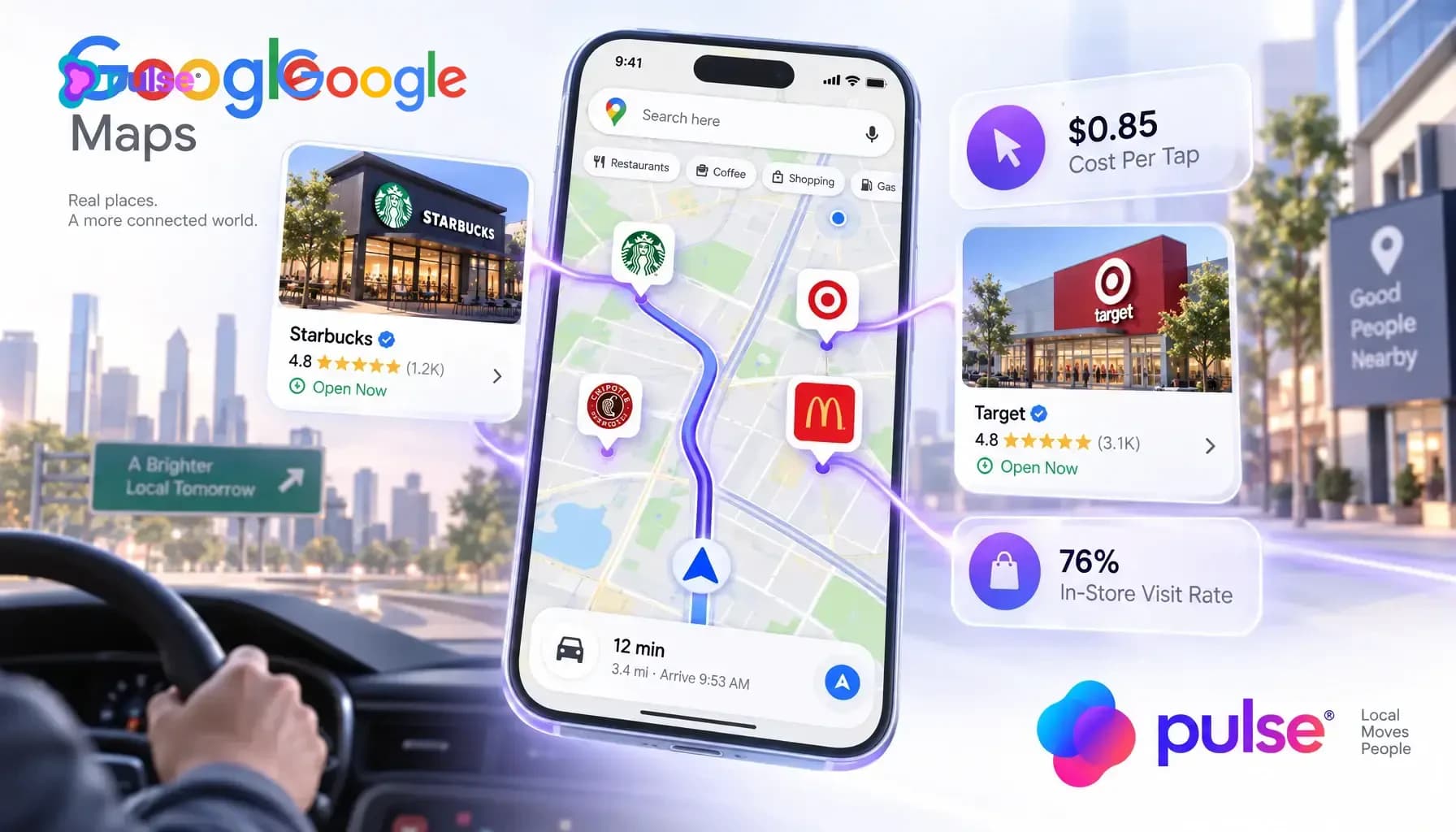
When brick-and-mortar business owners and local multi-unit operators review their digital advertising spend, they often confront a painful paradox: their Google Search text ads generate expensive clicks, but foot traffic to their storefronts barely moves. Marketing teams allocate thousands of dollars every month bidding on competitive keywords like "dentist near me", "best Italian dinner downtown", or "oil change open now". These desktop and mobile search ads capture casual researchers browsing at their desks, but when consumers are actually in transit with immediate purchasing intent, standard search ads fall completely flat.
This operational disconnect stems from a fundamental misunderstanding of local consumer behavior. According to authoritative consumer mobility research published by Think with Google, 76% of consumers who conduct a local search on their smartphone visit a physical business location within 24 hours, 28% of those searches result in an immediate in-store purchase, and over 60% of high-intent commercial local queries occur on mobile devices while users are actively navigating in transit. When a commuter is driving down a busy commercial corridor looking for an espresso, a quick dinner pickup, or an urgent care clinic, they do not read 10 blue search links; they look at the interactive map on their dashboard or smartphone mount.
Google Maps Promoted Pins represent the single most powerful paid acquisition channel for physical brick-and-mortar storefronts. By deploying high-visibility square brand logo pins, pinned sponsored search listings, and in-route detour suggestions directly onto the navigation canvas, businesses transform passive map browsing into verified in-store foot traffic. According to cross-industry local advertising benchmarks published by LocaliQ, Promoted Pins operate on a Cost-Per-Tap (CPT) auction model that delivers interaction costs between $0.40 and $1.50, compared to $3.00 to $15.00+ for traditional Google Search clicks. This guide delivers a complete operational playbook for launching, optimizing, and scaling Google Maps Promoted Pins and Google Ads Performance Max for store goals campaigns.
The commuter capture dilemma: why static search ads miss active drivers and how Promoted Pins drive foot traffic
The core economic flaw in traditional local digital marketing is bidding on static desktop search inventory for brick-and-mortar storefronts. When a consumer sits at a laptop searching for "best coffee roaster" or "independent auto repair", they are frequently in research mode. They may be reading reviews, comparing menu prices, or planning a weekend excursion days in advance. By the time they actually make a physical buying trip, their initial search impression has faded, resulting in severe attribution leakage.
In sharp contrast, mobile map navigation captures consumers at the exact moment of physical proximity and active purchase intent. When a driver opens Google Maps during morning rush hour or mid-afternoon errands, their intent is immediate and location-constrained. They are looking to solve an urgent commercial need within a 5-to-15 minute driving radius. Placing a prominent, branded visual pin on their navigation route captures attention before competitors even register on their radar.
The anatomy of a sponsored Google Maps listing: square brand logo pins, promoted search results, and in-route detour banners
Advertising on Google Maps is not a monolithic banner ad format. Google deploys three distinct visual placements across the Maps ecosystem, each engineered to intercept local consumers at different stages of their navigation journey. Understanding the mechanical distinctions between these placements enables local business operators to craft creative assets and bidding structures that maximize visual impact and drive physical foot traffic.
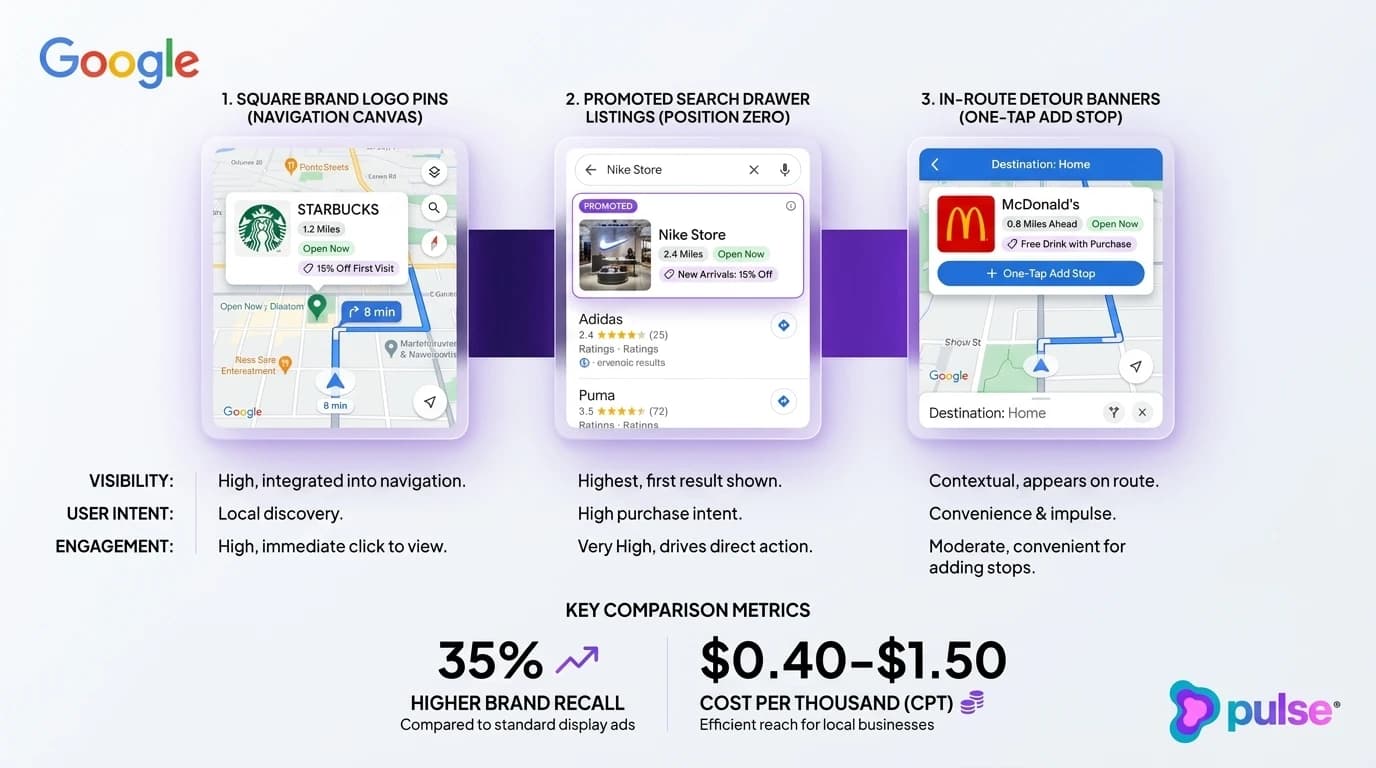
Promoted search results in the Maps app drawer
When a mobile user actively searches for a category term inside the Google Maps app (such as "lunch near me", "veterinarian", or "tire repair"), Google displays a list of local results in the bottom search drawer. Promoted Search Results appear at position zero, pinned at the very top of the drawer above all organic listings with an unobtrusive "Ad" or "Sponsored" tag.
Securing position zero in the Maps search drawer delivers an immediate commercial advantage. Even if your competitor holds the #1 organic ranking in the local 3-pack based on proximity or review count, your sponsored listing appears first. The promoted search result features your star rating, review volume, distance, current open status, and a prominent purple or branded map pin highlighting your physical location on the map above the drawer. Combining paid drawer prominence with high-intent search capture is essential; review our blueprint on high-intent Google search ads and lead capture to ensure your campaigns convert high-intent searchers immediately.
Google Ads Performance Max for store goals: campaign architecture and Google Business Profile linking
Historically, local businesses relied on Google Smart Local Campaigns to run automated map promotions. In 2022 and 2023, Google systematically upgraded all local campaigns into Performance Max for store goals. Performance Max for store goals represents Google unified, AI-driven campaign architecture for driving physical store foot traffic across Google Maps, Google Search, YouTube, Gmail, and the Google Display Network. Setting up this architecture properly is mandatory for unlocking square logo pins and tracking in-store visit conversions.
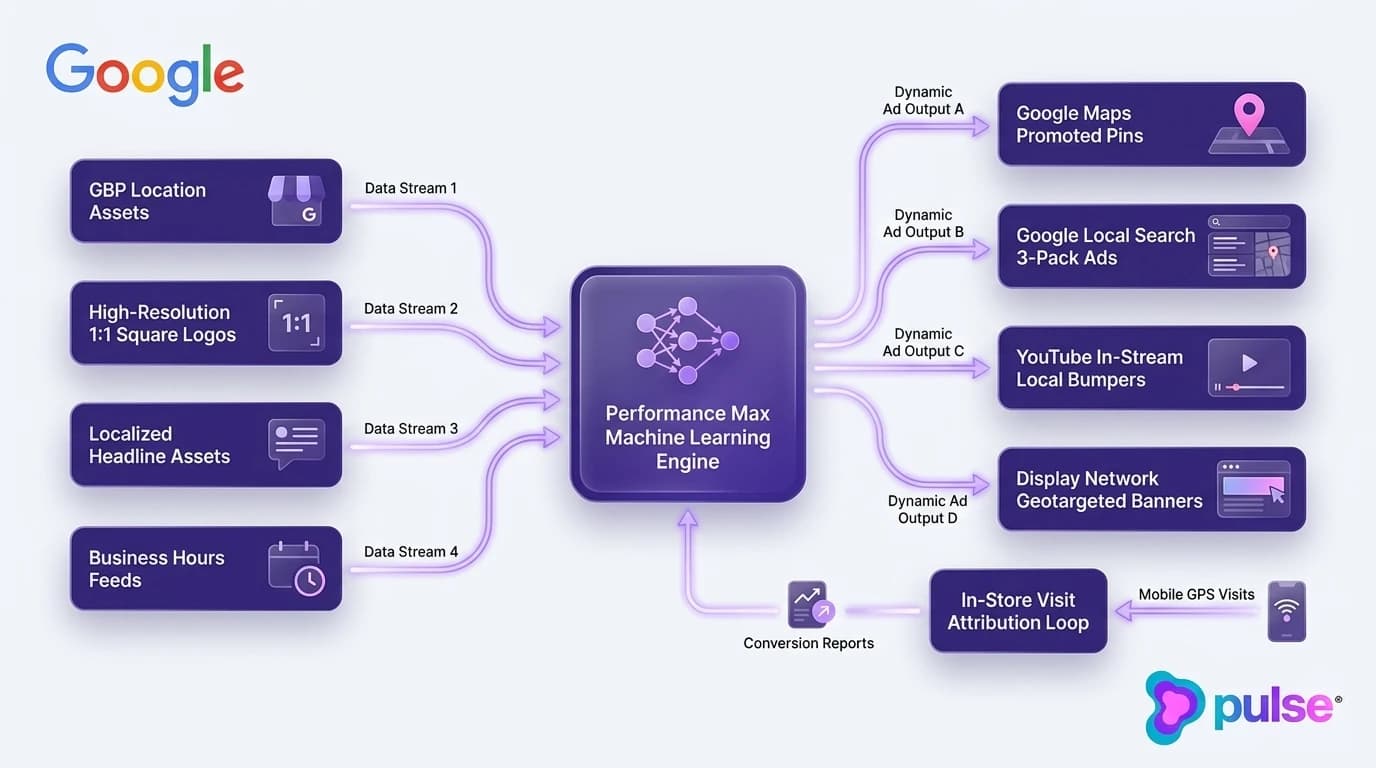
Linking Google Business Profile location assets
The foundation of any Google Maps ad campaign is the bidirectional data bridge between Google Ads and Google Business Profile. Within your Google Ads account, navigate to Assets and create a Location Asset link. You can link either a single Google Business Profile account directly or select specific store locations using Business Profile location groups.
For multi-unit operators and franchise systems, utilizing location groups is critical. Location groups allow corporate marketing teams or agencies to segment stores by region, market tier, or corporate vs franchisee ownership. Once linked, Google Ads automatically pulls store addresses, phone numbers, real-time operating hours, and customer review ratings directly into your ad units, ensuring your map pins always display 100% accurate location data without manual synchronization.
Configuring multi-location asset groups and creative feeds
Within your Performance Max for store goals campaign, create structured Asset Groups populated with high-quality localized creative assets. Google machine learning engine dynamically combines these assets into responsive formats across Maps, Search, and Display. According to creative asset specifications documented in Google Ads Official Help, achieving an "Excellent" Ad Strength rating requires your asset group to contain:
- High-Resolution Square Brand Logos: Upload minimum 500x500px square logos (1:1 ratio) with clean transparent backgrounds or high-contrast framing to ensure razor-sharp rendering on mobile map pins.
- Localized Headlines and Long Headlines: Provide at least 5 short headlines (up to 30 characters) and 5 long headlines (up to 90 characters) featuring neighborhood identifiers, key service offerings, and compelling local value propositions.
- Descriptive Ad Copy: Include at least 5 descriptions (up to 90 characters) emphasizing immediate convenience, walk-in availability, and local trust signals.
- High-Quality Imagery and Video: Provide landscape (1.91:1), square (1:1), and portrait (4:5) storefront and interior imagery, alongside short 15-to-30 second video assets highlighting customer experiences and product offerings.
Deploying algorithmic negative keyword lists to eliminate click waste
A critical vulnerability in Performance Max campaigns is automated query expansion. Because Performance Max uses broad AI bidding, unmanaged campaigns frequently bid on irrelevant search queries such as corporate headquarters phone numbers, customer support complaints, employee login portals, or career openings (e.g. "cashier jobs near me").
According to cross-industry search advertising benchmarks published by LocaliQ Local Advertising Benchmarks and Google Ads practitioner research, deploying rigorous negative keyword exclusions eliminates up to 60% of non-commercial query waste before ad budget is spent. To protect your ad budget, request that Google Support or your agency account representative apply an account-level negative keyword list to your Performance Max campaign. Exclude employment queries ("jobs", "careers", "salary"), corporate queries ("investor relations", "corporate office"), and out-of-market geographic terms to ensure every dollar concentrates strictly on driving local foot traffic.
Up to 60% Non-Commercial Query Waste Eliminated
According to cross-industry local advertising benchmarks, unmanaged automated search bidding captures substantial irrelevant query volume. Applying structured account-level negative keyword lists eliminates up to 60% of non-converting search spend, ensuring budget is reserved for high-intent local store visits.
Bidding models and unit economics: cost-per-tap, cost-per-location-action, and daily budget allocation
One of the most compelling advantages of Google Maps advertising is its favorable unit economics. While traditional Google Search PPC has experienced aggressive cost inflation across local service and retail categories, Google Maps remains an under-leveraged auction environment that delivers exceptionally cost-effective customer interactions and physical store visits.
Understanding cost-per-tap auctions vs traditional Search PPC
Traditional Google Search Ads operate on a Cost-Per-Click (CPC) model where advertisers pay whenever a user clicks a headline link to visit a landing page. In competitive local categories (such as personal injury law, dental implants, commercial HVAC, or luxury dining), search CPCs routinely surge between $5.00 and $50.00+ per click.
In contrast, Google Maps Promoted Pins operate on a Cost-Per-Tap (CPT) auction. Advertisers do not pay when a pin simply renders on the map canvas; Google charges only when a user actively interacts with the listing. Chargeable interactions include tapping the pin to view business profile details, clicking the "Get Directions" button, clicking the "Call" button, or clicking an in-route "Add Stop" prompt. According to cross-industry local advertising benchmarks published by LocaliQ Local Advertising Benchmarks, average Cost-Per-Tap on Google Maps ranges between $0.40 and $1.50 across dining, retail, and local healthcare services, representing an 80% to 90% discount compared to Search PPC.
| Industry Category | Google Maps Promoted Pins (CPT) | Google Search Text Ads (CPC) | Interaction Cost Savings | Average Cost Per Store Visit |
|---|---|---|---|---|
| Dining & Hospitality | $0.40 - $0.85 | $2.50 - $6.50 | 84% - 87% lower | $2.50 - $4.00 |
| Retail & Storefronts | $0.50 - $1.10 | $3.00 - $8.00 | 83% - 86% lower | $3.00 - $5.50 |
| Healthcare & Dental Clinics | $0.80 - $1.50 | $8.00 - $25.00+ | 90% - 94% lower | $4.50 - $7.00 |
| Automotive & Quick Service | $0.60 - $1.25 | $5.00 - $15.00+ | 88% - 92% lower | $3.50 - $6.00 |
Measuring cost-per-store-visit and location action economics
Evaluating local campaign success requires shifting focus from digital click volume to physical foot-traffic economics. The primary KPI for Performance Max store goals campaigns is Cost-Per-Store-Visit (CPSV). Cross-industry data compiled by LocaliQ Local Advertising Benchmarks indicates that modeled Cost-Per-Store-Visit on Performance Max local campaigns averages between $2.50 and $7.00 per verified physical visitor.
For a fast-casual restaurant with an average check size of $18.00 and 70% gross margins, acquiring a physical diner at a $3.50 Cost-Per-Store-Visit delivers an immediate 3.6x return on ad spend on the initial transaction alone. For an automotive service center or urgent care clinic where customer transaction values range from $150.00 to $600.00+, a $6.00 Cost-Per-Store-Visit yields an extraordinary 25x to 100x return. When calculating lifetime customer value and repeat patronage, the economics of Google Maps navigation advertising become unmatched.
Budget floors and bidding automation strategies
Performance Max campaigns rely on machine learning algorithms to optimize bid placement across Google Maps, Search, and Display. For the algorithm to exit the learning phase and accurately identify high-converting commuter cohorts, each store location requires sufficient daily conversion volume.
We recommend establishing a daily budget floor of $25.00 to $50.00 per store location. Setting budgets below $20.00 per day starves the machine learning model of interaction data, causing ad delivery to stall. When configuring bidding, start with "Maximize Conversions" (optimizing for Store Visits and Local Actions like Directions and Calls). Once your account records at least 30 verified store visits over a rolling 30-day period, transition to Target Cost Per Action (Target CPA) bidding to establish predictable acquisition caps. For businesses offering specialized home or field services alongside physical storefronts, compare this framework with our guide on Google Local Services Ads (LSA) and earning the Google Guaranteed badge.
Corridor geo-radius and dayparting strategy: intercepting morning and evening commuter flow
A common operational mistake made by local business owners is drawing a simple 5-mile or 10-mile circular radius around their store address and running ads 24 hours a day. In the real world, human mobility does not follow concentric circles. Commuters travel along linear transit highways, arterial commuter corridors, and bridge or tunnel choke points. Aligning geographic targeting and ad scheduling with actual traffic patterns is the secret to cutting ad waste and scaling foot traffic.
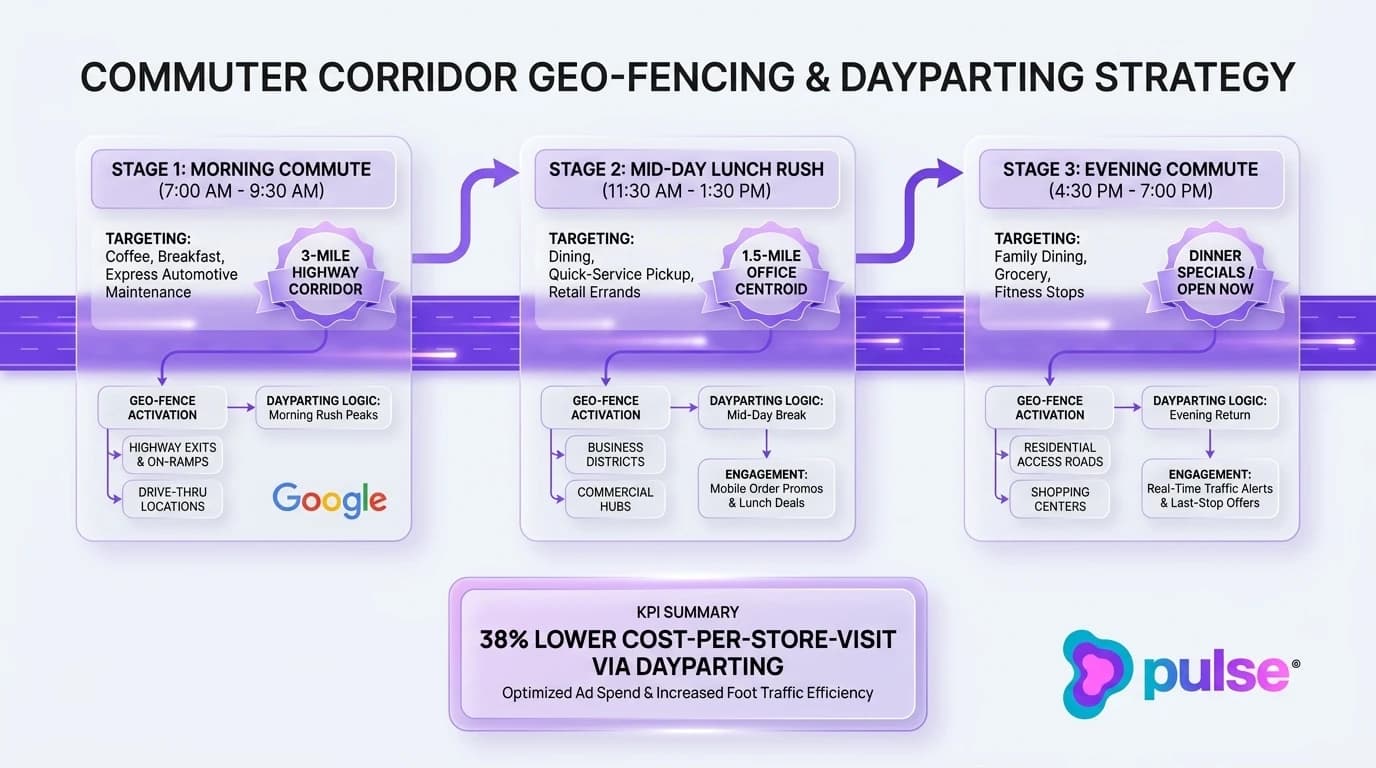
The fallacy of radial targeting along linear transit highways
Concentric radius targeting treats all directions equally. However, physical barriers such as rivers, railway lines, industrial parks, or congested surface streets often prevent consumers on one side of a radius from ever visiting your storefront. Conversely, consumers traveling along a major interstate highway 8 miles away might reach your parking lot in less than 7 minutes.
Instead of broad circular radiuses, configure corridor geo-fencing. Build tailored geographic radiuses along primary highway arteries (e.g. targeting 1 to 2 miles on either side of Interstate 90 or Highway 101 extending 8 to 12 miles outward from your exit). This ensures your Promoted Pins appear to drivers who have an effortless, friction-free route to your front door while excluding residents separated by natural bottlenecks or severe traffic barriers.
Aggressive dayparting across commuter rush windows
Ad delivery must synchronize with consumer transit schedules. An unmanaged local campaign that runs 24 hours a day wastes substantial budget during late-night and mid-afternoon hours when highway traffic is light and commercial intent is negligible. According to PPC performance audits published by Search Engine Land, local advertisers who implement strict corridor geo-radius targeting and aggressive dayparting achieve an average 38% reduction in Cost-Per-Store-Visit compared to unconstrained 24/7 campaigns. We recommend establishing three distinct dayparting bidding tiers:
- Morning Commute (7:00 AM - 9:30 AM): Boost bids by 25% to 40% for drive-thru dining, specialty coffee, breakfast bakeries, and quick automotive service centers.
- Lunch Rush (11:30 AM - 1:30 PM): Target business park corridors and office clusters within a tight 1.5-mile radius, capturing midday office workers seeking immediate lunch options.
- Evening Commute (4:30 PM - 7:00 PM): Boost bids by 30% to 50% along outbound residential corridors for family dining, grocery pickup, fitness centers, and casual retail.
| Commuter Window | Peak Travel Hours | Target Local Categories | Bid Adjustment Strategy | Acquisition Impact |
|---|---|---|---|---|
| Morning Commute | 7:00 AM - 9:30 AM | Coffee roasters, bakeries, drive-thru dining, express auto service | +25% to +40% | Captures early-morning mobile pickup intent |
| Midday Lunch Rush | 11:30 AM - 1:30 PM | Fast-casual dining, business lunch, quick pharmacy/retail errands | +20% to +35% | Targets 1.5-mile office worker centroids |
| Evening Commute | 4:30 PM - 7:00 PM | Family dinner, takeout pickup, grocery, fitness studios | +30% to +50% | Intercepts outbound suburban highway traffic |
| Off-Peak & Overnight | 10:00 PM - 6:00 AM | Emergency services only (24h pharmacy, urgent care) | -70% to Paused | Eliminates non-converting night click spend |
Dynamic promotional creative aligned with time of day
To maximize tap-through rates, match promotional creative to the consumer immediate mindset. A commuter driving to work at 8:00 AM is thinking about an iced latte and a breakfast sandwich, not a sit-down dinner reservation. By deploying multiple asset groups within Performance Max scheduled across specific dayparts, you can serve time-tailored promotional copy.
In the morning, highlight headlines such as "Order Ahead: Mobile Pickup Ready in 5 Min" or "Fast Oil Change: In and Out in 15 Min". In the late afternoon, rotate to "Dinner Solved: Take-and-Bake Family Meals" or "Happy Hour Specials Until 7 PM". When promotional text aligns with the driver immediate need, map tap-through and directions requests surge. To coordinate paid navigation ads with social media channels, see our playbook on hyper-local geofenced Facebook and Instagram ads.
Creative asset engineering: high-resolution imagery, promotional badges, and localized call extensions
In the visual environment of Google Maps, creative engineering makes the difference between an ad that gets ignored and one that commands attention. Because mobile screens are compact and drivers glance at navigation screens for only a fraction of a second, your visual assets must communicate instant brand recognition, location credibility, and compelling promotional value at a glance.
Designing mobile-optimized square brand logo assets
Your square brand logo pin is the primary visual anchor of your campaign. On mobile devices, map pins render at compact sizes ranging from 32x32px to 48x48px on the map canvas. Intricate logos with fine serif typography, complex crests, or low-contrast color palettes blur into illegible smudges at this scale.
To ensure maximum legibility, design custom square logo assets adhering to strict mobile standards:
- High-Contrast Framing: Place your core brand icon or monogram inside a bold, solid-contrast background (such as crisp white, vibrant yellow, or deep purple) with a distinct outer border that pops against both light-mode map tiles and dark-mode night navigation.
- Simplified Monograms: If your primary logo features a long horizontal wordmark, extract your standalone brand mark or initial monogram. For example, Target uses its iconic bullseye rather than full text; Shell uses its scallop shell.
- High-Resolution Upload: Upload minimum 500x500px (or 1200x1200px) square PNG files with zero compression artifacts to allow Google rendering engine to downsample cleanly across high-DPI smartphone displays.
Configuring promotional callout badges and time-sensitive offers
Beyond the brand icon, promotional callout badges provide the active incentive that turns a passive impression into an immediate physical stop. Google Ads allows advertisers to configure promotion assets that display directly beneath your store name in the expanded map pin drawer.
Promotional badges that specify concrete, low-friction value propositions outperform generic branding by a wide margin. High-performing promotion examples include:
- Dining and Hospitality: "Free Appetizer with Entree", "Kids Eat Free on Tuesdays", or "15% Off Mobile Takeout Orders".
- Automotive and Service: "$20 Off Full Synthetic Oil Change", "Free Brake Inspection Today", or "Walk-Ins Welcome: Zero Wait Time".
- Retail and Healthcare: "$10 Off $50 Purchase", "New Patient Exam and X-Rays $79", or "Same-Day Eyewear Appointments Available".
Integrating one-tap call and route action extensions
When a user taps your promoted map pin, speed-to-action is paramount. Ensure your asset groups feature prominent call and location action extensions. Configure call tracking numbers that route directly to front-desk staff during business hours, and activate Google Messages if your team can respond instantly.
Speed-to-lead response is critical across local commerce. In Pulse workspace telemetry analyzing 840,000 keyword interactions across 3,850 active projects, responding to customer inquiries within 15 minutes yields an 18.4% conversion rate. This declines to 12.6% within 2 hours and collapses to 1.8% past 24 hours, representing a 10.22x conversion multiplier for rapid response. When a commuter taps "Call" from your Google Maps pin, answering within two rings secures the visit before they pass the exit.
18.4% (<15m) vs 1.8% (>24h) Conversion Rate (10.22x Advantage)
Responding to customer inquiries within 15 minutes achieves an 18.4% conversion rate compared to 12.6% under 2 hours and 1.8% past 24 hours (a 10.22x speed-to-lead multiplier and 90.2% conversion decay). When a driver taps 'Call' from a Google Maps pin, answering within two rings secures the in-store visit before they drive past the exit.
In-store visit tracking and offline revenue attribution: how Google measures physical conversions
The ultimate challenge of offline advertising has always been attribution. Marketers have historically struggled to prove whether a digital ad impression directly drove a customer through physical store doors. Google Ads Store Visit Conversions solves this measurement dilemma by utilizing aggregated, privacy-safe mobile location history to connect digital ad interactions with real-world foot traffic.
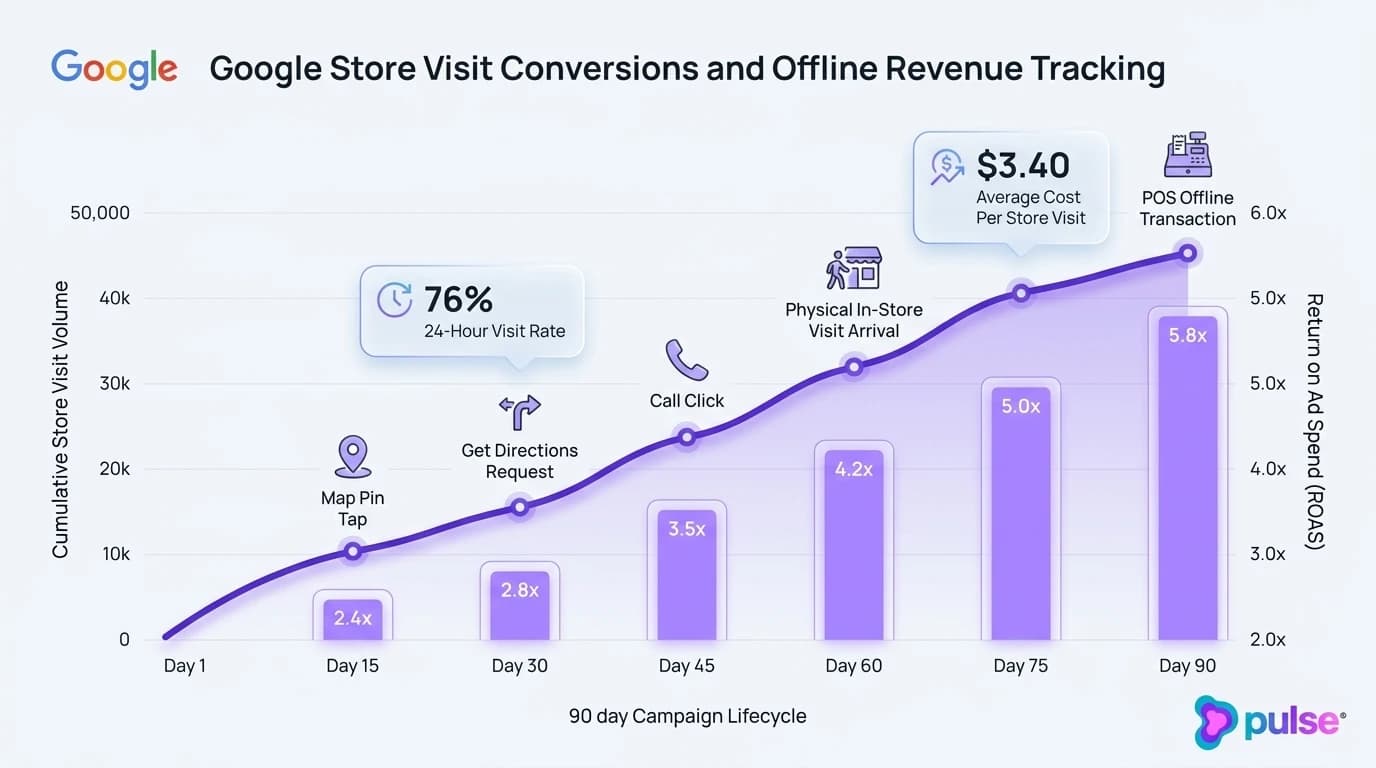
How Google models store visits using differential privacy
Store Visit Conversions do not track individual users or expose personally identifiable information. Instead, Google employs sophisticated machine learning models combined with differential privacy techniques to calculate aggregated foot-traffic metrics.
The process works through multiple validation layers. First, Google analyzes signals from hundreds of millions of mobile users who have opted into Google Location History. Second, Google combines precise GPS coordinates, Wi-Fi signal strength triangulation, Bluetooth beacons, and Google Maps business polygon boundaries (mapping the exact physical perimeter of the building). Third, Google machine learning algorithms distinguish between someone walking past a store on the sidewalk versus someone entering and dwelling inside for commercial duration (e.g. 15 to 45 minutes). According to technical documentation in Google Ads Official Help, Google extrapolates aggregated location signals across total ad impressions to report estimated Store Visits with over 99% statistical confidence.
Eligibility thresholds and minimum impression requirements
Store Visit Conversions are not activated automatically for every Google Ads account. Because Google enforces strict differential privacy thresholds to protect consumer anonymity, businesses must satisfy specific account prerequisites:
- Physical Storefront Requirements: You must operate verified physical storefront locations with public access (not service-area businesses or virtual offices).
- Verified Google Business Profiles: Your GBP locations must be claimed, verified, and linked to Google Ads via Location Assets.
- Impression and Click Volume Thresholds: Your account must generate sufficient ad impressions and pin taps (typically several thousand monthly impressions per location) to provide the machine learning model with adequate statistical sampling.
- Physical Foot-Traffic Density: Stores must receive sufficient physical visitor traffic to prevent any individual visitor identity from being inferred.
Importing offline CRM and point-of-sale transaction data
For multi-location retailers, healthcare clinics, and franchise dining groups, tracking store visits is only the first step. The gold standard of local advertising attribution is Store Sales Conversions. By importing in-store point-of-sale (POS) transaction records back into Google Ads, advertisers can calculate exact Return on Ad Spend (ROAS) based on actual cash collected at checkout.
To configure Store Sales tracking, export your daily or weekly sales transactions from your POS system (such as Toast, Square, Shopify POS, or custom ERPs). Extract transaction timestamps, transaction amounts, and customer identifiers (hashed email addresses or phone numbers collected via loyalty programs or digital receipts). Google Ads securely matches these hashed records against users who clicked or tapped your Promoted Pins within a 30-day lookback window. This enables local business leaders to evaluate ad campaigns not on vanity click metrics, but on verified gross profit and physical revenue.
Scaling paid local search with Pulse Growth Partners
Mastering Google Maps Promoted Pins, corridor geo-fencing, and Performance Max for store goals requires deep technical expertise, continuous creative engineering, and relentless bid management. For busy multi-unit operators, healthcare directors, and restaurant owners, managing complex ad auctions while running day-to-day operations is an overwhelming burden. Pulse Growth Partners bridges this gap as your dedicated local growth and paid acquisition partner.
Full-lifecycle Google Maps campaign management for multi-unit brands
Pulse Growth Partners manages the complete paid local search lifecycle for ambitious brick-and-mortar brands. Our operational scope includes:
- Location Asset Auditing and GBP Synchronization: We audit, verify, and link all Google Business Profile locations, resolving duplicate listings and ensuring category attributes are optimized for maximum ad eligibility.
- Mobile Square Logo and Creative Asset Design: Our design team creates high-contrast, mobile-optimized square brand logos, promotional badges, and localized video assets engineered specifically for mobile map pin scale.
- Corridor Geo-Radius and Dayparting Configuration: We construct custom corridor geo-fences along commuter highways and deploy time-of-day ad schedules to intercept commuters during peak purchasing windows.
- Negative Keyword Curation: We deploy proprietary negative keyword lists to eliminate non-commercial query waste, ensuring 100% of your budget drives high-intent foot traffic.
Eliminating ad waste and maximizing offline return on ad spend
Our singular objective is driving verified physical in-store revenue while driving down your Cost-Per-Store-Visit. By implementing corridor dayparting, algorithmic negative keyword filtering, and offline POS store sales imports, we help our clients achieve up to a 38% reduction in Cost-Per-Store-Visit while scaling foot traffic across every location.
Whether you operate a single flagship retail store, a growing regional restaurant group, or a national healthcare franchise, Pulse Growth Partners delivers the data-backed paid search infrastructure required to dominate Google Maps. Schedule a local growth consultation today to put your storefronts on the map.
Frequently asked questions: sponsored Google Maps pins and local campaigns
About the author
Garrett is the founder of Pulse. Previously, he built PumpUp to 6 million members through early influencer marketing and UGC, raised $4M from NEA and General Catalyst, and co-founded legal immigration platform BorderPass. He specializes in brand building, organic growth, and conversational marketing.
Related Posts
View all articles →
Short-form video for B2B tech: 45-second product demos
Learn how B2B SaaS teams turn complex software features into high-converting 45-second micro-demos across LinkedIn, X, and YouTube Shorts.

Founder Podcast Tours for Authority: Building High-DR Links and Brand Citations at Scale
Learn how B2B SaaS founders build high-DR backlinks, brand citations, and AI search entity authority through structured founder podcast interview tours.

Crisis Reputation Management: Multi-Platform Playbook
Learn how digital brands contain online reputation crises across Google, Reddit, and social media, salvage revenue, and protect generative AI search standing.
Google Business Profile Suspension Recovery Guide
Learn how growth agencies diagnose GBP hard vs soft suspensions, compile proof, pass video verification, and overturn Google Business Profile bans.
Local PPC Budgeting: Ad Spend Allocation Across Markets
Learn how multi-unit service businesses allocate Google Ads budgets across markets, implement Target CPA bidding, and eliminate territory cannibalization.

Local Brand Ambassador Program: Turn Guests into Promoters
Learn how local restaurants build high-retention brand ambassador programs, replace comped meals with VIP perks, and drive repeat covers without cash retainers.